Mod Mixer
A downloadable mod
Mods silently break each other. When two mods change the same game function, the one that loads last usually wins — the other mod's work just vanishes: no error, no crash, no explanation. ModMixer finds these conflicts, explains them in plain English, and gives you a control panel to settle them.
THE SWITCHBOARD
A full control panel in the in-game menu (look for the ModMixer icon), six tabs:
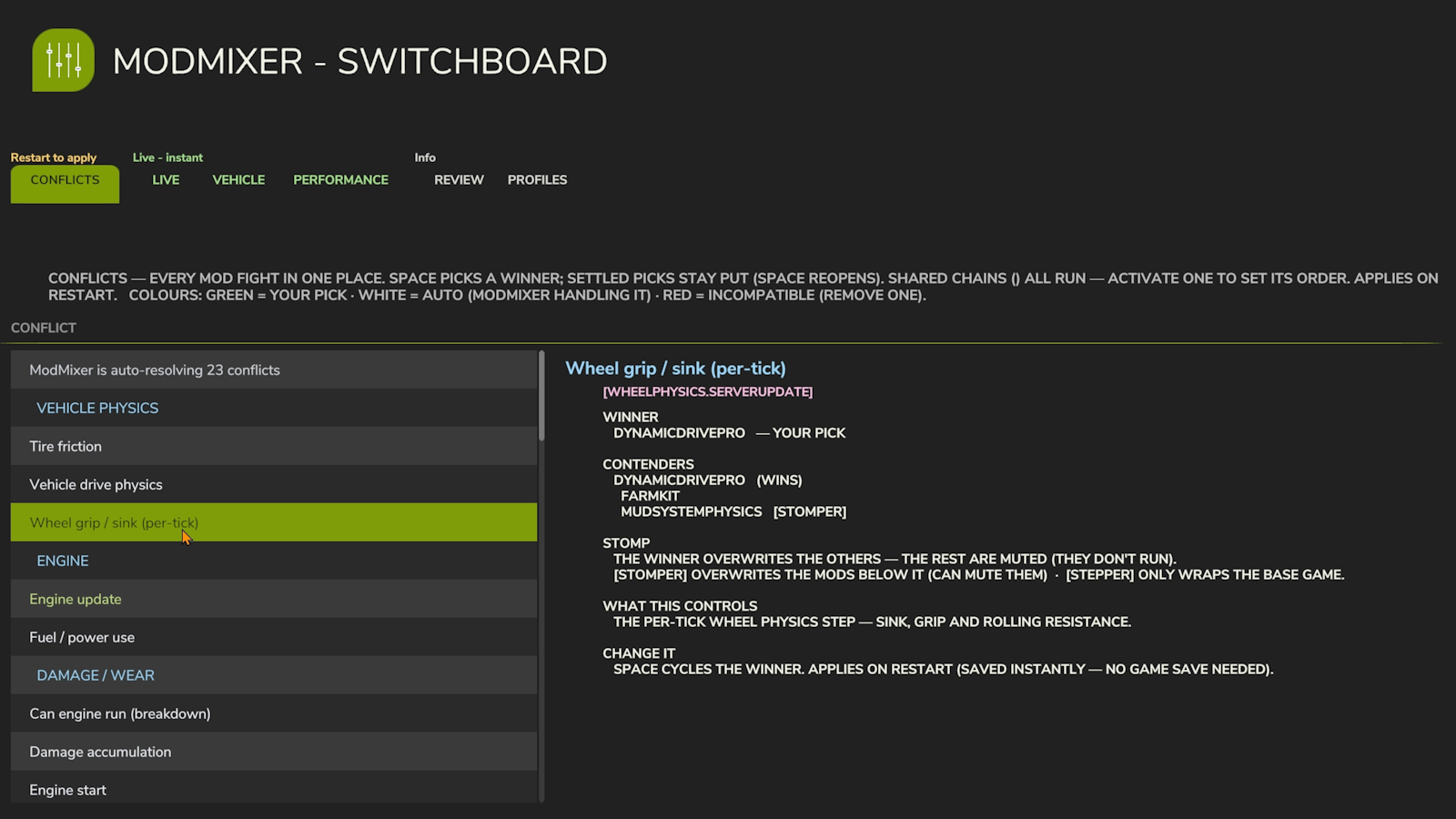
- CONFLICTS — every mod fight in one place. Pick a winner (that mod wins, the rest are muted) or activate a shared chain to set its run-order — all restart-gated. Switch the view (top-left): SIMPLE ranks mods (higher wins everywhere), BY CATEGORY settles one realm at a time (wheels, HUD, economy, weather...), ADVANCED shows every contested function with its full hook chain — who runs first, who overrides whom.
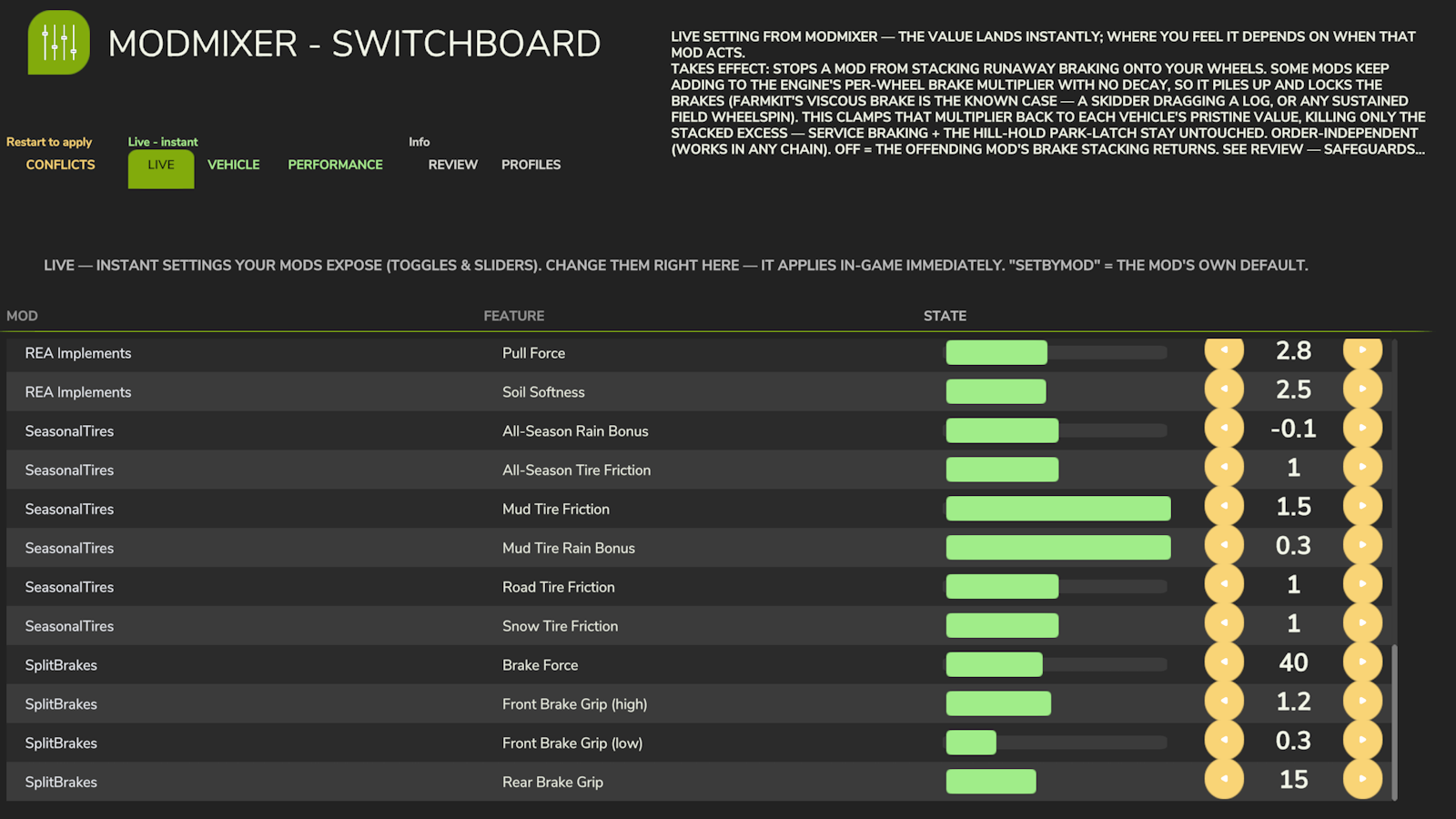
- LIVE — instant settings your mods expose (toggles and sliders), applied in-game immediately.
- VEHICLE — live diagnostics of the machine you're sitting in: damage, wear, temperature, speed, mass, per-wheel grip.
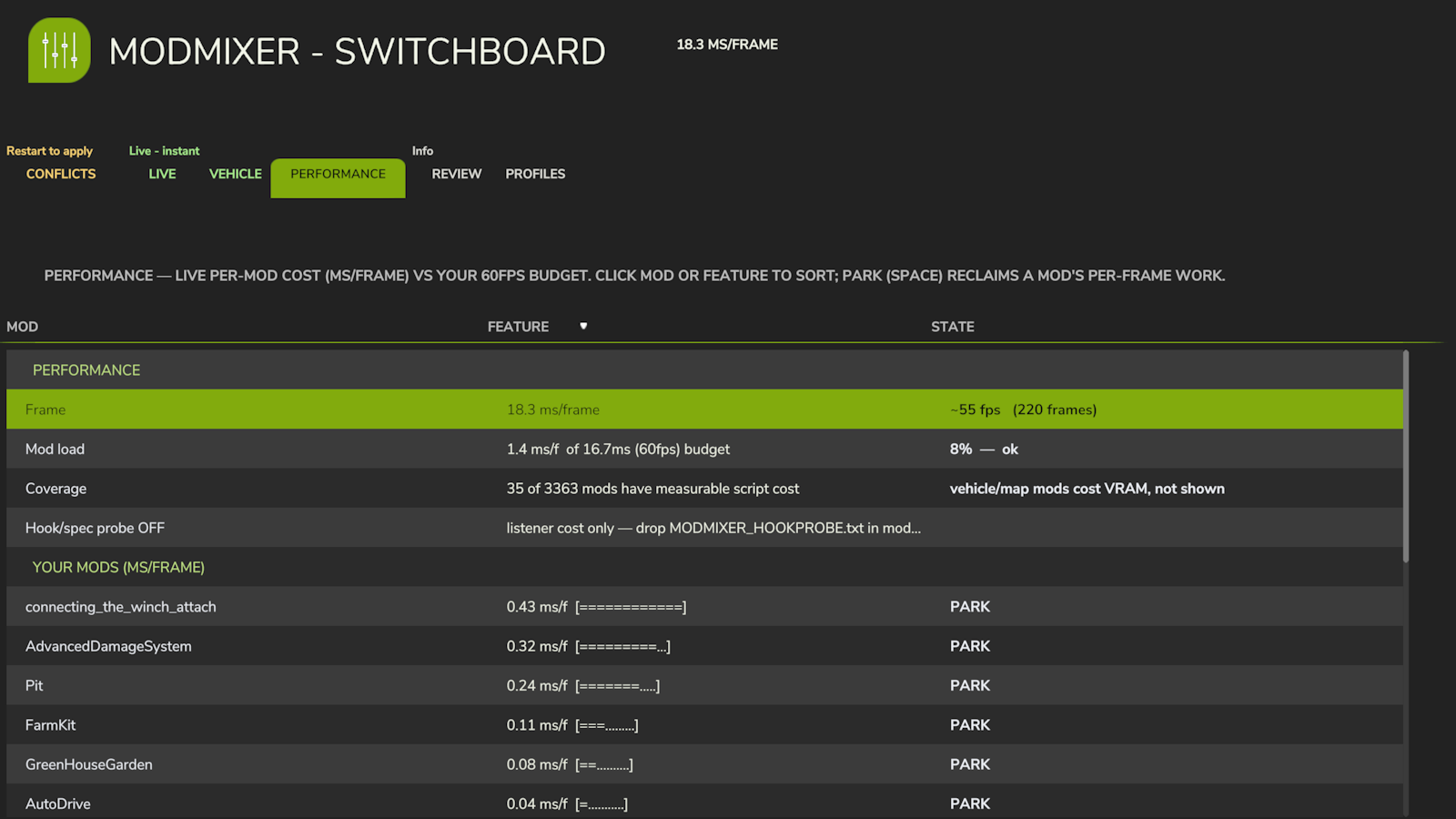
- PERFORMANCE — live per-mod cost (ms per frame) against your fps budget. Find the mod eating your frame rate and park it without uninstalling.
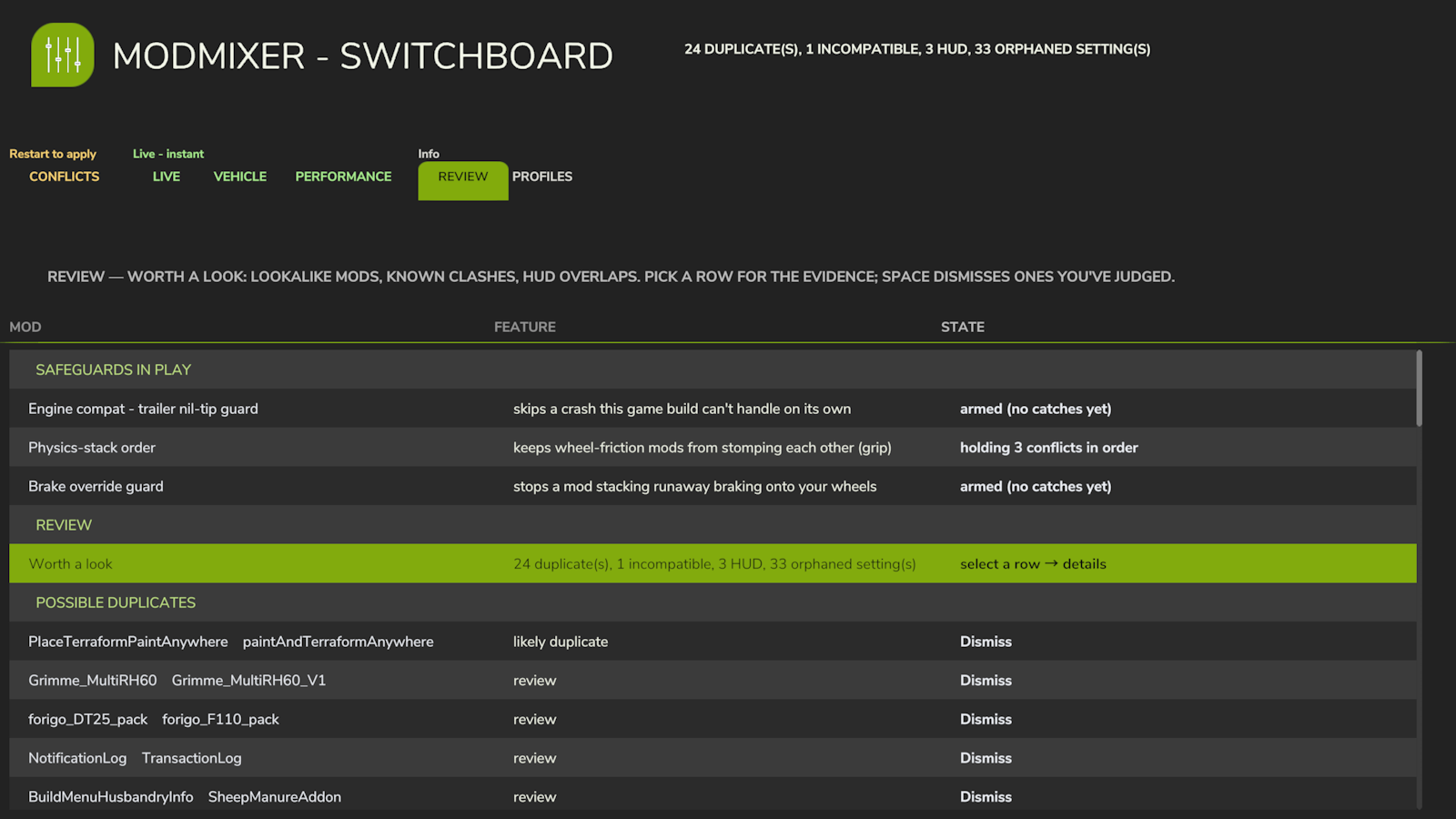
- REVIEW — worth a look: likely duplicate mods, known incompatible pairs, HUD overlaps — each with evidence. Dismiss what you've judged.
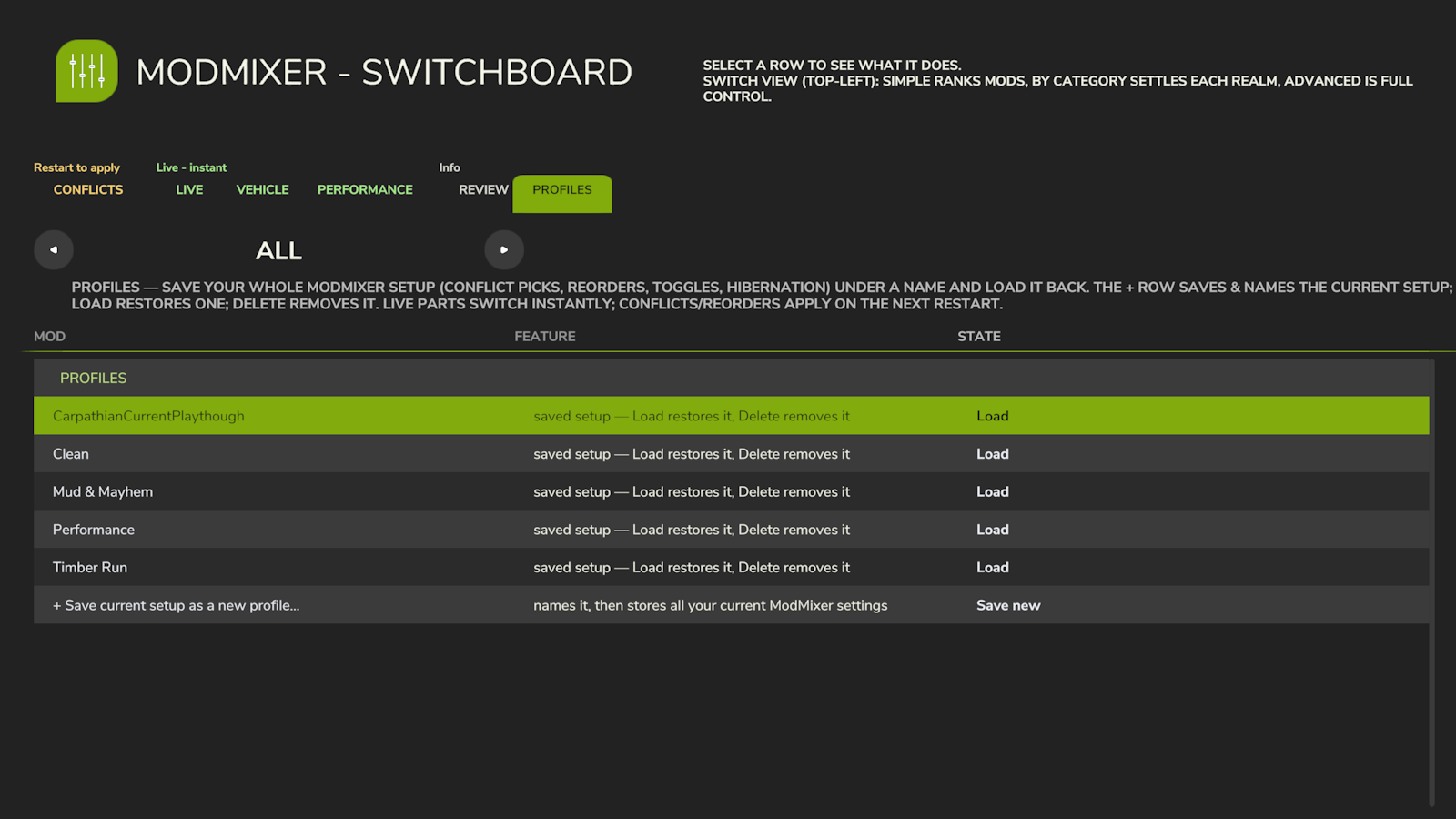
- PROFILES — save your whole ModMixer setup (conflict picks, reorders, toggles, hibernation) under a name and load it back.
Every row comes with a plain-English explanation. You still get the classic boot conflict report (ModMixer.log, next to your game log) and an on-screen warning when two flatly incompatible mods are installed.
BUILT SAFE
- Structural changes (reorder, mute) apply on restart — nothing is rewired mid-game.
- Load-critical functions are locked and can never be vetoed.
- If a launch doesn't complete, the next one starts in safe mode automatically (all levers off) — your game always loads.
- Manual kill switch: create an empty file MODMIXER_SAFE_MODE.txt in modSettings/FS25_ModMixer/.
- Disk footprint: ModMixer stores only its own settings, profiles, and a boot-recovery marker under modSettings/FS25_ModMixer/ — nothing elsewhere, and it makes no network connections.
- Abnormal-load protection: if a load comes up with no farm (a conflict brick), ModMixer blocks that session's saves so the broken state can't overwrite your existing savegame, then self-recovers on the next launch.
IMPORTANT: keep the zip named FS25_0_ModMixer.zip — the 0 makes it load before your other mods, which is how it sees every hook they install.
Multiplayer: loads and reports per client; the Switchboard's levers are designed for singleplayer.
Changelog 1.4.1.0:
- Fixed: reordering a chain containing a mod that re-registers its hooks per vehicle type (e.g. Advanced Damage System) could break savegame loads. Such chains are now order-locked (winner-pick still works), and any affected saved order is neutralized automatically.
- Multiplayer: warns when levers are active (configs are per-client, not synced).
- More contested functions named; further load-critical locks.
Changelog 1.4.0.0:
- The Switchboard — the six-tab control panel above (Conflicts / Live / Vehicle / Performance / Review / Profiles)
- Performance profiler with live per-mod frame cost and Park
- Review hub, vehicle diagnostics, and the boot-recovery safety net
Download
Click download now to get access to the following files:
Comments
Log in with itch.io to leave a comment.
I have to say again this mod is so game changing. Genius! Any other mods in the pipeline? Thanks
Thank you very much! Yes there are some more due very shortly, a bit smaller scale than Mod Mixer tho. Still nice. Stay tuned!!
One thing I noticed is that the mod is very noisy. Its constantly spamming the log, which makes it difficult to see anything esle thats going on. You might want to limit some of that if possible.
ok duly noted! It does have its own log as well so I will tone it down. Thank you.
A new version is live with address to your feedback directly. Thanking you kindly.
Cool!. Ill check it out
After using this mod, I load in under the map or load in and the game is frozen. Is this a known issue? Stops once I remove
Thanks for flagging this — that's not a known issue on the current build, but it does look like a specific failure pattern we've fought before, so I want to nail it down properly rather than guess. Two quick things that'd help a ton: (1) had you set anything in the Conflicts tab (a reorder, or "make winner" on a conflict) before this happened? (2) could you try dropping an empty file named
MODMIXER_SAFE_MODE.txtintomodSettings/FS25_ModMixer/and relaunching — does the freeze/under-map thing still happen with that in place? That file forces ModMixer to skip all its levers for one load without losing your setup, so it'll tell us fast whether this is a config issue or something deeper. Really appreciate you reporting it — this is exactly the kind of thing that gets fixed properly instead of guessed at.I think there was one or two that reorders and yes I didn't notice until after I did the reorder, because I had not restarted it prior to those changes, so it may have been due to my reorder. Yes i will drop this empty folder it, do you think that will resolve it? I have placed it back into my mod folder and will update you.
loading under the map appears to be about a 50% chance rate. Folder was empty. Errors are related to the ADS (Advanced Damage System), which is one that I changed the order of, but it is not happening every time I load in.
Really useful, thank you — that narrows it a lot. Two follow-ups: (1) when you tested with
MODMIXER_SAFE_MODE.txtsitting inmodSettings/FS25_ModMixer/, did the under-the-map thing still happen, or hadn't you tried a load with it in yet? (2) could you paste the exact line fromModMixer.log(next to your game log) that mentions ADS? The literal error text will tell us a lot more than the summary. If it turns out safe mode does stop it, that confirms this is a lever issue we can fix outright rather than something inherent to having ADS installed.2026-07-01 16:00:19.179 Ooops in updateVehiclePhysics :C:/Users/Joseph's PC/Documents/FS Mod Collection/mods/FS25_AdvancedDamageSystem/scripts/ADS_Breakdowns.lua:5563: attempt to call missing method 'isUnderService' of table
2026-07-01 16:00:19.179 Error: Running LUA method 'update'.
dataS/scripts/vehicles/specializations/Locomotive.lua:538: invalid argument #1 to 'abs' (number expected, got string)
2026-07-01 16:00:19.296 Ooops in updateVehiclePhysics :C:/Users/Joseph's PC/Documents/FS Mod Collection/mods/FS25_AdvancedDamageSystem/scripts/ADS_Breakdowns.lua:5563: attempt to call missing method 'isUnderService' of table
2026-07-01 16:00:19.296 Error: Running LUA method 'update'.
dataS/scripts/vehicles/specializations/Locomotive.lua:538: invalid argument #1 to 'abs' (number expected, got string)
2026-07-01 16:00:19.318 Ooops in updateVehiclePhysics :C:/Users/Joseph's PC/Documents/FS Mod Collection/mods/FS25_AdvancedDamageSystem/scripts/ADS_Breakdowns.lua:5563: attempt to call missing method 'isUnderService' of table
2026-07-01 16:00:19.318 Error: Running LUA method 'update'.
dataS/scripts/vehicles/specializations/Locomotive.lua:538: invalid argument #1 to 'abs' (number expected, got string)
2026-07-01 16:00:19.340 Ooops in updateVehiclePhysics :C:/Users/Joseph's PC/Documents/FS Mod Collection/mods/FS25_AdvancedDamageSystem/scripts/ADS_Breakdowns.lua:5563: attempt to call missing method 'isUnderService' of table
2026-07-01 16:00:19.340 Error: Running LUA method 'update'.
dataS/scripts/vehicles/specializations/Locomotive.lua:538: invalid argument #1 to 'abs' (number expected, got string)
2026-07-01 16:00:19.357 Ooops in updateVehiclePhysics :C:/Users/Joseph's PC/Documents/FS Mod Collection/mods/FS25_AdvancedDamageSystem/scripts/ADS_Breakdowns.lua:5563: attempt to call missing method 'isUnderService' of table
2026-07-01 16:00:19.357 Error: Running LUA method 'update'.
ModMixer 1.3.0.0
------------------------------------------------------------
=== ModMixer loading ===
INFO: AdvancedDamageSystem duplicate-registration suppressor active.
[HIGH] SpecializationUtil.registerFunction (hasBreakdown)
This mod registers 'hasBreakdown' twice in its own registerFunctions, which logs repeated registration errors on load. ModMixer suppresses the duplicate at runtime so the first registration stands and the errors stop.
[HIGH] PlayerInputComponent.registerGlobalPlayerActionEvents
Courseplay safely overwrites (calls superFunc). Loads at C, before all 12 appenders (D-W). Chain intact. Guarded log only.
[HIGH] HandToolHands.consoleCommandToggleSuperStrength
LumberJack safely overwrites (L). EasyDevControls appends first (E < L), so EDC is baked into LumberJack's superFunc chain. Both mods' logic runs. Log only.
[MEDIUM] AI driving systems (behavioural)
AutoDrive and Courseplay are both AI vehicle-routing systems. Hook chains are clean — all AutoDrive hooks call superFunc and are installed inside AutoDrive:loadMap() (not at Lua execution time). Behavioural conflict if both systems are assigned to the same vehicle simultaneously. Use one per vehicle. AutoDrive also adds safe appends to ConstructionScreen.draw (alongside MovePlaceablesAdvanced and constructionSearch) and BaseMission.draw (alongside 3DInspector) — all additive, nothing lost.
[INFO] GuiTopDownCursor.updateRaycast / getPosition / getHitTerrainPosition
PerfectEdge replaces three top-down cursor functions without calling superFunc. No other installed mod hooks these functions — it is a safe solo replacement that improves cursor precision in construction mode. If a future mod also hooks these functions it would conflict.
[INFO] Vehicle.load
TerraFarm overwrites Vehicle.load but calls superFunc (uses/returns the base load result); Courseplay prepends. Chain intact — base load runs, both mods add their per-vehicle data. Log only.
Conflict summary: 3 HIGH, 1 MEDIUM, 2 INFO. See ModMixer.log for details.
=== SCAN-BASED DETECTION (dataset generated 2026-06-01 12:46:11) ===
[SCAN][CRITICAL] AnimalSystem.loadAnimals (STOMP / UNKNOWN) BetterHorseValue + RealisticLivestockRM
3 broken overwriter(s): FS25_EnhancedLivestock, FS25_RealisticLivestock, FS25_RealisticLivestockRM (+1 safe ow) (+2 chainers)
[SCAN] uncatalogued CRITICAL: AnimalSystem.loadAnimals (BetterHorseValue + RealisticLivestockRM)
[SCAN][CRITICAL] ConstructionBrush.verifyAccess (STOMP / UNKNOWN) NoRestrictedFences + UnrestrictedPlacement + UsedEquipmentYards + paintAndTerraformAnywhere [catalogued above]
3 broken overwriter(s): FS25_AditionalGameSettings, FS25_NoRestrictedFences, FS25_PlaceTerraformPaintAnywhere (+4 safe ow) (+1 chainers)
[SCAN][CRITICAL] ConstructionBrushNewFence.validateCurrentSegment (STOMP / UNKNOWN) NoRestrictedFences + UsedEquipmentYards
1 broken overwriter(s): FS25_NoRestrictedFences (+2 safe ow)
[SCAN] uncatalogued CRITICAL: ConstructionBrushNewFence.validateCurrentSegment (NoRestrictedFences + UsedEquipmentYards)
[SCAN][CRITICAL] MissionManager.getIsMissionWorkAllowed (STOMP / UNKNOWN) RedTape + TipAnywhere
1 broken overwriter(s): FS25_WorkAnywhere (+7 safe ow) (+2 chainers)
[SCAN] uncatalogued CRITICAL: MissionManager.getIsMissionWorkAllowed (RedTape + TipAnywhere)
[SCAN][CRITICAL] PlaceableHusbandryAnimals.addAnimals (STOMP / UNKNOWN) RealisticLivestockRM + RedTape
2 broken overwriter(s): FS25_EnhancedLivestock, FS25_RealisticLivestock (+2 safe ow) (+1 chainers)
[SCAN] uncatalogued CRITICAL: PlaceableHusbandryAnimals.addAnimals (RealisticLivestockRM + RedTape)
[SCAN][CRITICAL] WheelPhysics.updateTireFriction (STOMP / HIGH) MudSystemPhysics + VariableTirePressure [catalogued above]
1 broken overwriter(s): MoreRealistic (+2 safe ow) (+1 chainers)
[SCAN][HIGH] AnimalScreen.setSelectionState (LOAD_ORDER / UNKNOWN) AnimalsTrailerOnly + RealisticLivestockRM
Overwriter(s): FS25_EnhancedLivestock, FS25_RealisticLivestock, FS25_RealisticLivestockRM | Chainers: FS25_AnimalsTrailerOnly, FS25_Farming_RP_Pack, FS25_HardcoreBalanceMod, FS25_RealisticLivestockRM
[SCAN] uncatalogued HIGH: AnimalScreen.setSelectionState (AnimalsTrailerOnly + RealisticLivestockRM)
[SCAN][HIGH] Cutter.onEndWorkAreaProcessing (LOAD_ORDER / MEDIUM) FollowMe + MoistureSystem [catalogued above]
Overwriter(s): FS25_CombineXP, FS25_MoistureSystem | Chainers: FS25_FollowMe
[SCAN][HIGH] FSBaseMission.sendInitialClientState (LOAD_ORDER / LOW) AdvancedDamageSystem + BankCredit + EasyDevControls + LumberJack + MoistureSystem + RealisticLivestockRM + RedTape + TipAnywhere + UsedEquipmentYards [catalogued above]
Overwriter(s): FS25_PowerTools, FS25_UniversalAutoload_Fix, FS25_UniversalAutoload_V1_0_2_8 | Chainers: FS25_0_TerraFarm_V1_6_2, FS25_AGRO_CENTRUM_FINANSOWE_UPDATE_v2_0, FS25_AdjustAnimalFood, FS25_AdjustStorageCapacity, FS25_AdvancedDamageSystem, FS25_AnimalHerdingLite, FS25_BaleDegradation, FS25_BankCredit, FS25_ContractsAndInvoices, FS25_CropRotation, FS25_CustomContracts, FS25_DistributionCostOverride, FS25_DynamicFieldFires, FS25_EasyDevControls, FS25_EnhancedAnimalSystem, FS25_EnhancedLivestock, FS25_FarmlandMarket, FS25_FieldLeasing, FS25_FieldRename, FS25_Fresh, FS25_HirePurchasing, FS25_InvoiceSystem, FS25_Invoices, FS25_LumberJack, FS25_MoistureSystem, FS25_MoveHusbandryAnimals, FS25_MultiplayerVehicleKeys, FS25_NPCFavor, FS25_RealisticLivestock, FS25_RealisticLivestockRM, FS25_RealisticWeather, FS25_RedTape, FS25_RentYourField, FS25_SeasonalCropStress, FS25_SelfFixAndRepaint, FS25_SellToTheBestBidder, FS25_TaskList, FS25_TipAnywhere, FS25_ToggleFertilizer, FS25_UsedEquipmentYards, FS25_VehicleYearsSystem, FS25_Workplan
[SCAN][HIGH] FSCareerMissionInfo.saveToXMLFile (LOAD_ORDER / LOW) EasyDevControls + MapObjectsHider + ProductionControl + RealisticLivestockRM
Overwriter(s): FS25_CropRotation, FS25_PalletSpawnStore | Chainers: FS25_AdditionalContracts, FS25_AdjustStorageCapacity, FS25_AnimalCaretaker, FS25_AnimalHerdingLite, FS25_CombineXP, FS25_Configure_Maintenance, FS25_Contracts_Plus, FS25_CooperativaCredito, FS25_Courseplay_V8_1_0_3, FS25_CropRotation, FS25_CustomTriggerCreator, FS25_DistributionCostOverride, FS25_DynamicFieldFires, FS25_DynamicFieldPrices, FS25_EasyDevControls, FS25_EnhancedAnimalSystem, FS25_EnhancedLivestock, FS25_FarmTablet, FS25_FarmlandMarket, FS25_FarmsCleanup, FS25_FieldLeasing, FS25_FieldRename, FS25_FieldToDoList, FS25_FuelCosts, FS25_GPSHeadlandAssist, FS25_GrassCollection, FS25_HelperPrice, FS25_ImprovedHay, FS25_InvoiceSystem, FS25_MapObjectsHider, FS25_NPCFavor, FS25_ParkItUnderARoof, FS25_PrecisionHands, FS25_ProductionControl, FS25_RealTimeSync_1, FS25_RealisticLivestock, FS25_RealisticLivestockRM, FS25_RealisticWeather, FS25_RentYourField, FS25_SeasonalCropStress, FS25_SeasonalWoolProduction, FS25_SellToTheBestBidder, FS25_SoilFertilizer, FS25_SuperPerson, FS25_Through_The_Years, FS25_ToggleFertilizer, FS25_ToolPositionSaver, FS25_UpgradeYourFactory, FS25_UsedPlus, FS25_WorkingNeighborOnField, FS25_WorkplaceTriggers, FS25_YieldTracker, FS25_baleDirect, FS25_bankInvestment, FS25_gameplay_AutoLookAround, FS25_gameplay_Real_Vehicle_Breakdowns, FS25_netWorthTracker, FS25_proSeed
[SCAN] uncatalogued HIGH: FSCareerMissionInfo.saveToXMLFile (EasyDevControls + MapObjectsHider + ProductionControl + RealisticLivestockRM)
[SCAN][HIGH] Farm.changeBalance (LOAD_ORDER / UNKNOWN) BankCredit + RedTape [catalogued above]
Overwriter(s): FS25_RoddHarderEconomy, FS25_XP_Progression, zzzFS25_RoddZeroOperatingCosts | Chainers: FS25_BankCredit, FS25_FarmTablet, FS25_RedTape, FS25_SellMultiplier, FS25_TransactionLog
[SCAN][HIGH] HandToolChainsaw.updateRingSelector (LOAD_ORDER / HIGH) EasyDevControls + LumberJack [catalogued above]
Overwriter(s): FS25_EasyDevControls, FS25_ForestryHelper, FS25_LumberJack | Chainers: FS25_ChallengeStart, FS25_ForestryHelper
[SCAN][HIGH] HandToolHands.consoleCommandToggleSuperStrength (LOAD_ORDER / UNKNOWN) EasyDevControls + LumberJack [catalogued above]
Overwriter(s): FS25_LumberJack | Chainers: FS25_EasyDevControls
[SCAN][HIGH] PlaceableHusbandry.onHourChanged (LOAD_ORDER / MEDIUM) RealisticLivestockRM + RedTape
Overwriter(s): FS25_RedTape | Chainers: FS25_EnhancedLivestock, FS25_RealisticLivestock, FS25_RealisticLivestockRM
[SCAN] uncatalogued HIGH: PlaceableHusbandry.onHourChanged (RealisticLivestockRM + RedTape)
[SCAN][HIGH] PlayerInputComponent.registerActionEvents (LOAD_ORDER / MEDIUM) AdvancedDamageSystem + EasyDevControls [catalogued above]
Overwriter(s): FS25_HudSelect, FS25_RandomPlayerSounds_BMP, FS25_miniMapLayer | Chainers: FS25_AdvancedDamageSystem, FS25_CustomTriggerCreator, FS25_EasyDevControls, FS25_FieldToDoList, FS25_FuelCosts, FS25_FullVehicleSystems, FS25_GrassCollection, FS25_IncomeMod, FS25_MarketDynamics, FS25_NPCFavor, FS25_PlayerSpeed_V1_1, FS25_QuickCamera, FS25_RandomWorldEvents, FS25_SeasonalCropStress, FS25_SellMultiplier, FS25_SoilFertilizer, FS25_TakeSingleObjects, FS25_TaxMod, FS25_ToggleFertilizer, FS25_UsedPlus, FS25_VehicleExplorer, FS25_VehicleSleeperCab, FS25_WorkplaceTriggers, FS25_manualCover, FS25_modularHUD
[SCAN][HIGH] PlayerInputComponent.registerGlobalPlayerActionEvents (LOAD_ORDER / UNKNOWN) EasyDevControls + InputHelpPager + Machinery_Pie_Menu + MapObjectsHider + MoistureSystem + RealisticLivestockRM + RedTape + headTrackICextension [catalogued above]
Overwriter(s): FS25_Courseplay_V8_1_0_3, FS25_MoistureSystem, FS25_RedTape, FS25_TaskList, FS25_TradeInMenu, FS25_bankInvestment | Chainers: FS25_AdditionalContracts, FS25_AdjustStorageCapacity, FS25_AlexTheAnimalHelper, FS25_AllRoundExtension, FS25_AnimalCaretaker, FS25_AnimalFoodOverview, FS25_AnimalHerdingLite, FS25_AnimalsDisplay, FS25_AnimatedObjectExtend, FS25_AntiAFK, FS25_AutoRepairs, FS25_AutoRun, FS25_ChallengeStart, FS25_CircularMenu_Of_HandTools, FS25_Contrails, FS25_CutOpenBale, FS25_EasyDevControls, FS25_EnhancedHelpMenu, FS25_EnhancedLivestock, FS25_EnterClosestVehicle, FS25_FarmKit, FS25_Farm_Manager, FS25_FarmlandOverview, FS25_FarmlandOverview_Extended, FS25_FieldExporter_V1_1, FS25_FillTypeAmountPriceDisplay_V1_0_0_1, FS25_FlightMode, FS25_Forester, FS25_Fresh, FS25_FullVehicleSystems, FS25_HeapPreview, FS25_HideHelpTexts, FS25_HouseRentIncome, FS25_InputHelpPager, FS25_LitresToTonnes, FS25_Machinery_Pie_Menu, FS25_MapObjectsHider, FS25_MoreVisualAnimals, FS25_MoreVisualAnimalsRM, FS25_NXProductions, FS25_NXVehicleMileage, FS25_NoWorkers, FS25_NotificationLog, FS25_PlaceableOverview, FS25_PlayerTeleportDisplay, FS25_PowerTools, FS25_ProductionInfoHud, FS25_RadialVehicleSwitcher, FS25_RealisticLivestock, FS25_RealisticLivestockRM, FS25_RealisticShopping, FS25_RealisticWeather, FS25_ScreenshotMode, FS25_SellMultiplier, FS25_SellToTheBestBidder, FS25_SteeringLock, FS25_StumpHighlighter, FS25_TakeSingleObjects, FS25_ToggleFertilizer, FS25_ToolWorkLines_v0_1_0_3, FS25_TransactionLog, FS25_VIPOrderManager, FS25_VehicleFruitHud, FS25_VehicleInspector, FS25_VehicleManager, FS25_VehicleMileage, FS25_VehicleSwitchFilter, FS25_WoodManager, FS25_WorkerProgress, FS25_XP_Progression, FS25_growNow, FS25_headTrackICextension, FS25_playerPosition, FS25_pushBales
[SCAN][HIGH] PlayerInputComponent.update (LOAD_ORDER / HIGH) AdvancedDamageSystem + MoistureSystem + RealisticLivestockRM [catalogued above]
Overwriter(s): FS25_AdvancedDamageSystem, FS25_RealisticShopping, FS25_manualCover | Chainers: FS25_AnimalHerdingLite, FS25_AutoRun, FS25_EnhancedLivestock, FS25_ImprovedHay, FS25_MoistureSystem, FS25_MoreVisualAnimals, FS25_MoreVisualAnimalsRM, FS25_RealisticLivestock, FS25_RealisticLivestockRM, FS25_RealisticWeather, FS25_VehicleSleeperCab
[SCAN][HIGH] WheelPhysics.serverUpdate (LOAD_ORDER / HIGH) LongerLastingMud + MudSystemPhysics
Overwriter(s): FS25_MudSystemPhysics | Chainers: FS25_DynamicDrivePro, FS25_FarmKit, FS25_LongerLastingMud, FS25_TireTrackDamage, FS25_Wet_Wheel_Tracks
[SCAN] uncatalogued HIGH: WheelPhysics.serverUpdate (LongerLastingMud + MudSystemPhysics)
[SCAN][MEDIUM] FSBaseMission.onDayChanged (WARM_CHAIN / MEDIUM) EnhancedColorSelection + RealisticLivestockRM + UnrestrictedPlacement [catalogued above]
20 chainers on MEDIUM-freq fn
[SCAN][MEDIUM] FSBaseMission.onHourChanged (WARM_CHAIN / MEDIUM) EnhancedColorSelection + UnrestrictedPlacement [catalogued above]
18 chainers on MEDIUM-freq fn
[SCAN][MEDIUM] FSBaseMission.onMinuteChanged (WARM_CHAIN / MEDIUM) EnhancedColorSelection + UnrestrictedPlacement [catalogued above]
14 chainers on MEDIUM-freq fn
[SCAN][MEDIUM] InGameMenuSettingsFrame.updateGeneralSettings (HOT_CHAIN / HIGH) headTrackICextension + interactiveControl
9 chainers on HIGH-freq fn
[SCAN][MEDIUM] PlayerHUDUpdater.delete (HOT_CHAIN / HIGH) MoistureSystem + RealisticLivestockRM
6 chainers on HIGH-freq fn
[SCAN][MEDIUM] PlayerHUDUpdater.update (HOT_CHAIN / HIGH) EasyDevControls + MoistureSystem + RealisticLivestockRM + UsedEquipmentYards
10 chainers on HIGH-freq fn
[SCAN][MEDIUM] PlayerInputComponent.unregisterActionEvents (WARM_CHAIN / MEDIUM) EasyDevControls + InputHelpPager + headTrackICextension
14 chainers on MEDIUM-freq fn
Scan-based detection: 25 active conflicts (13 catalogued, 12 uncatalogued); 302 benign INFO chains. Dataset: 940 mods scanned. See ModMixer.log.
INFO: registerGlobalPlayerActionEvents — Courseplay (safe overwrite) + 3 appenders. Chain is intact (Courseplay loads at C < all appenders).
INFO: 45 benign append chains found across installed mods. Multiple mods append to the same function (Utils.appendedFunction) with no overwriter present — every mod's logic runs in sequence, nothing is lost. No action required.
INFO: 22 safe overwrite chains found across installed mods. Multiple mods overwrite the same function but every overwriter calls superFunc, preserving the full chain. No action required.
INFO: FSCareerMissionInfo.saveToXMLFile has the largest safe chain in this install — 10 mods all append their save data (DynamicFieldPrices, EasyDevControls, EnhancedLoanSystem, FieldLeasing, MapObjectsHider, RealisticWeather, SeasonalWoolProduction, ToggleFertilizer, UpgradeYourFactory, netWorthTracker). All additive, nothing lost. No action required.
=== ModMixer loaded — full report in ModMixer.log ===
I removed a ton of the script mods I had after reviewing this!
This is a Godsend!
question i take it able to sort stuff out it self and if you want to reorder you can cool week mod not to be fair
This version does not sort anything for you, it just gives you the information and toolset to make the changes yourself. the reorder chain mode is the best way as it will show you where stomps are occurring and let you reorder them if it is causing an issue.
Auto sorting is something that is on the agenda for a future version.
This mod saved my Fs25
Thats great to hear!